 PermitNav
Your permit
is the route.
PermitNav reads your state oversize/overweight permit and rebuilds its route road by road, checked against the permit — then guides you down it, turn by turn, on a map built for heavy haul.
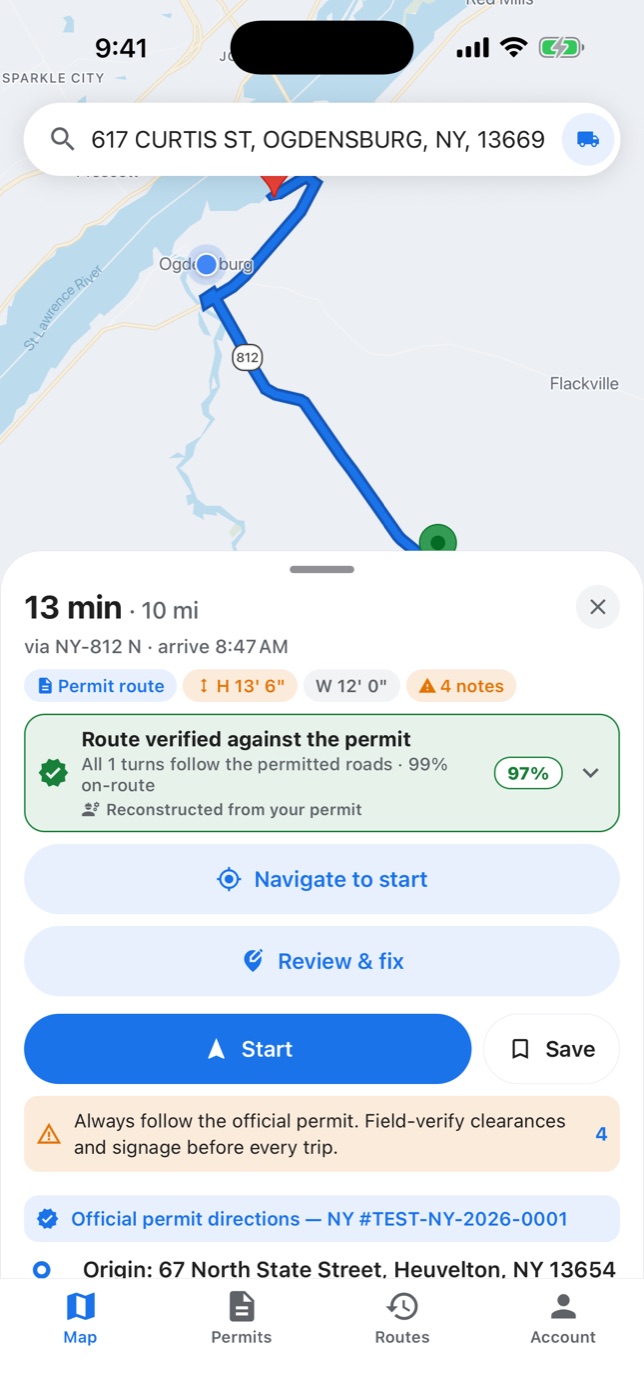
Stop tracing your permit onto a consumer map.
PermitNav turns the permit's routing table into a navigable route.
From permit to navigation in a few minutes.
-
Exit 1
Add your permit
Photograph it or upload the PDF straight from your state's permit email.
-
Exit 2
Review the route
PermitNav rebuilds the permitted route and shows it on the map, with any uncertain segments flagged for your review.
-
Exit 3
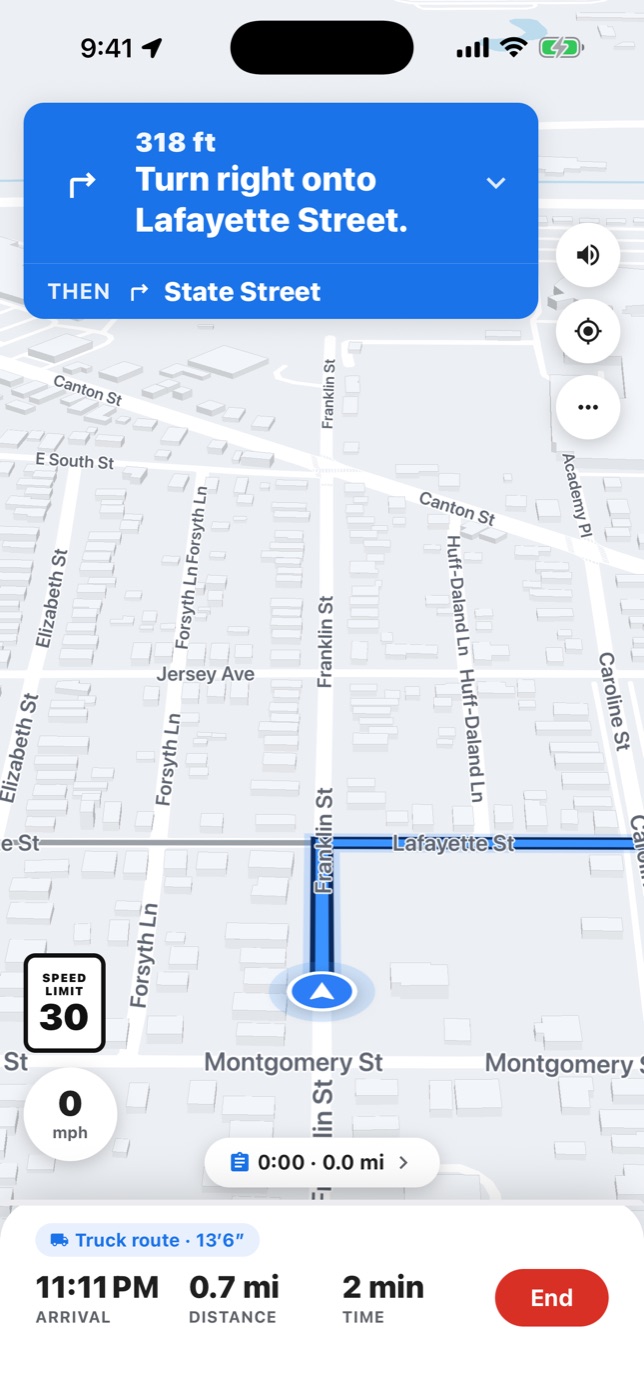
Drive it
Start turn-by-turn navigation and follow your permitted route with confidence.
Built for oversize/overweight moves
Reads your permit
Snap a photo or upload the PDF. PermitNav extracts the routing table, dimensions, and conditions automatically.
Follows the named roads
It rebuilds the route road by road across the roads your permit names, in the order it lists them, and checks it against the permit — not the fastest detour.
Turn-by-turn navigation
Clear voice and on-screen guidance with off-route alerts, designed for the cab.
Flags questionable segments
If a segment can't be confirmed against your permit, PermitNav flags it so you can verify before you roll.
Multi-state trips
Carrying permits for several states on one move? Chain them into a single end-to-end route across state lines.
Heavy-haul aware
Routing accounts for your vehicle and load dimensions so guidance fits the truck you're actually driving.
Simple pricing
Subscribe for ongoing moves, or buy a single permit credit when you just need one.
For the occasional move
For regular runs
For busy owner-operators
For multi-truck operations
One permit, no subscription
PermitNav offers auto-renewing monthly subscriptions. Payment is charged through your App Store (Apple ID) or Google Play account at purchase. Subscriptions renew automatically unless auto-renew is turned off at least 24 hours before the period ends; manage or cancel anytime in your App Store or Google Play subscription settings. Prices are in USD and may vary by region.
Real help from the people who built it.
We review every route-error report.
Still need a hand?
Email us and we'll get back to you, typically within one business day.
[email protected]How accurate is the route?
PermitNav reconstructs your route directly from the roads your permit names, then verifies each segment against the permit. Where a segment can't be confirmed, it's flagged so you can check it. Routing is an aid only — the official permit always governs, and you should field-verify clearances before every move.
Which states are supported?
New York, Pennsylvania, Kentucky, Tennessee, Missouri, Texas and Maryland permits are supported today. If your state isn't yet, email us — we add states based on driver demand.
A turn looks wrong. What do I do?
Stop and confirm against your official permit and the issuing agency before proceeding. Report it in-app or email [email protected] — we review every credible report and act on it.
How do subscriptions and cancellation work?
Subscriptions are billed monthly through the App Store or Google Play and renew automatically. You can manage or cancel anytime in your store's subscription settings (iPhone: Settings → your name → Subscriptions; Android: Play Store → profile → Payments & subscriptions). Turning off auto-renew at least 24 hours before the period ends stops the next charge.
How do I delete my account and data?
Delete your account in the app (Account → Delete account) or on our account deletion page. That deletes your account and its data, except the permit documents you uploaded, which are kept unlinked from any account — see our Privacy Policy.
Does PermitNav replace my permit?
No. PermitNav is a convenience aid. You must carry the official permit, follow it exactly, and present it on request. Where PermitNav and the official permit differ, the official permit controls. See our Safety Disclaimer.
Your permit. Your route.
Turn-by-turn.
OSOW truck navigation for New York, Pennsylvania, Kentucky, Tennessee, Missouri, Texas and Maryland permits.